How to Complete and File Form BIR60 Individual Tax Return for Hong Kong Salaries Tax
A complete guide to Form BIR60 for Hong Kong salaries tax, covering income reporting, allowances, deductions, and filing deadlines.
BIR60 at a glance
- Official title
- Individual Tax Return
- Issued by
- Inland Revenue Department
- Deadline
- Generally within one month of issue
We link the issuing authority's own index rather than hosting a copy, because the form is revised there and an out-of-date copy is worse than none.
Form BIR60 Individual Tax Return Hong Kong
The Form BIR60 Hong Kong individual tax return is the Inland Revenue Department's standard document for individuals chargeable to salaries tax. It consolidates employment income, business profits from a sole proprietorship, and property rental income within a single return.
Understanding Form BIR60 and Salaries Tax
Form BIR60 is an annual tax return. The Inland Revenue Department sends it to individuals who have notified them of chargeability or have been issued returns in previous years. The return covers salaries tax, profits tax from a sole proprietorship, and property tax. For most employed individuals, only the salaries tax sections are relevant.
Salaries tax is charged on assessable income arising in or derived from Hong Kong. This includes wages, bonuses, commissions, tips and fringe benefits. The tax is computed at progressive rates on net chargeable income, capped at the standard rate on net total income.
How to File Form BIR60 in Hong Kong
You can file by post or electronically. Paper returns are posted to the individual's registered address and must be completed and sent back to the department. Electronic filing is available through the Tax Representative Portal, a secure online platform that allows individuals or their authorised tax representatives to submit the return digitally. Register with the Inland Revenue Department for a user account to use the portal. The department has been expanding electronic filing options, but as of 2026, many individuals still receive paper returns. Keep a copy of the completed return and any supporting documents for at least six years if you file electronically.
BIR60 Filing Deadline Hong Kong
The Inland Revenue Department issues Form BIR60 on the first working day of April each year, covering the year of assessment that ended on 31 March. The BIR60 filing deadline Hong Kong is one month from the issue date. The return is due by early May.
Automatic extensions apply for taxpayers who file electronically through the Tax Representative Portal or use a tax representative. The extended deadline is two months from the issue date, so the return is due by early June. If you do not receive a return but have taxable income from a Hong Kong source, notify the Inland Revenue Department within four months after the end of the year of assessment. Failure to file by the deadline triggers a late filing penalty: a fine of up to HK$10,000 and additional tax of up to three times the amount undercharged.
Completing the Salaries Tax Sections
Form BIR60 is divided into several parts. For salaries tax, the key sections are Part 1 (personal particulars), Part 4 (income), Part 5 (allowances), and Part 6 (deductions).
Report your name, Hong Kong identity card number, marital status, and contact details in Part 1. In Part 4, report all employment income received during the year of assessment. This includes salary, wages, bonuses, commissions, directors' fees, and any fringe benefits such as housing, share awards, or company car benefits. Report any income from a former employer or from a non-Hong Kong source if it is chargeable to salaries tax under the employment source rules.
Claiming Personal Allowances
Part 5 lists the personal allowances you can claim. These reduce your net chargeable income before tax is applied. The basic allowance is one every individual is entitled to claim automatically. If you are married, you and your spouse can elect for joint assessment under salaries tax, which may increase the total allowances available. Other allowances include the child allowance, dependent parent allowance, single parent allowance, and working full-time parent allowance. Provide the relevant details, the names and Hong Kong identity card numbers of dependants, and ensure they meet the eligibility conditions under the Inland Revenue Ordinance.
Applying for Deductions
Part 6 allows you to claim deductions from your assessable income before tax is computed. These reduce the amount of income subject to salaries tax. Common deductions include recognised retirement scheme contributions, self-education expenses approved by the commissioner, home loan interest on a property you occupy, approved charitable donations of at least HK$100, and compulsory MPF contributions made by an employee.
Each deduction has specific limits and conditions. Home loan interest is deductible only for the first 20 years of the loan, and you must occupy the property as your principal place of residence. Charitable donations cannot exceed 35% of your net assessable income after deductions.
Provisional Tax and Hold-Over Applications
When you file Form BIR60, the Inland Revenue Department also assesses provisional tax for the following year of assessment. Provisional tax is an advance payment of the estimated tax liability for the next year, based on the current year's assessable income. It is payable in two instalments, typically in December and April.
Apply for a hold-over of provisional tax if your income in the following year is likely to be lower than the current year, or if you have ceased to have chargeable income. The application is made on Form BIR60 itself, in Part 9, or by separate written notice to the Inland Revenue Department. The department must receive the hold-over application within 14 days after the due date for payment of the provisional tax instalment. Miss that window and you may have to pay the full amount and claim a refund later.
Objection and Correction
If you disagree with the tax assessment issued after you file Form BIR60, you have the right to object under section 64 of the Inland Revenue Ordinance. The objection must be made in writing within one month after the date of the notice of assessment, stating the grounds and the amount of tax you believe is overcharged. The Inland Revenue Department will review the objection and may issue a revised assessment. An extension is available only in exceptional circumstances if you miss the deadline. File a correct return within the objection period if you find an error after submission.
Penalties for Late or Incorrect Filing
Filing late or providing incorrect information carries serious consequences. Under section 80 of the Inland Revenue Ordinance, the Inland Revenue Department can impose a penalty of up to three times the tax undercharged, plus a fine of up to HK$50,000. For late filing without a reasonable excuse, the penalty is a fixed sum of HK$1,000 to HK$5,000 for the first offence, escalating for repeated non-compliance. Fraud or wilful evasion may lead to criminal prosecution. File the return by the deadline and ensure all income and claim amounts are accurate.
Relation to Profits Tax
Form BIR60 is for individuals, not companies. File Form BIR51 for profits tax if you operate a Hong Kong company. The profits tax return covers corporate income at the standard rate, while Form BIR60 covers personal income. If you are self-employed as a sole proprietor, report that business income in Part3 of Form BIR60, it is taxed under profits tax rules within the same return. The key difference: salaries tax applies to employment income, while profits tax applies to trade, profession, or business income. The Inland Revenue Department issues separate returns for each entity type.
Where to Get Form BIR60
The Inland Revenue Department sends Form BIR60 automatically to individuals on the tax register. Download the form from the department's website if you have not received a return but believe you have chargeable income. The department also provides a handy guide to completing the form, with a line-by-line explanation of each section. Do not download a form from unofficial sources. The department revises the form periodically and a stale copy will not be accepted. Always check the issue date on the form before filing.
How to fill out Form BIR60
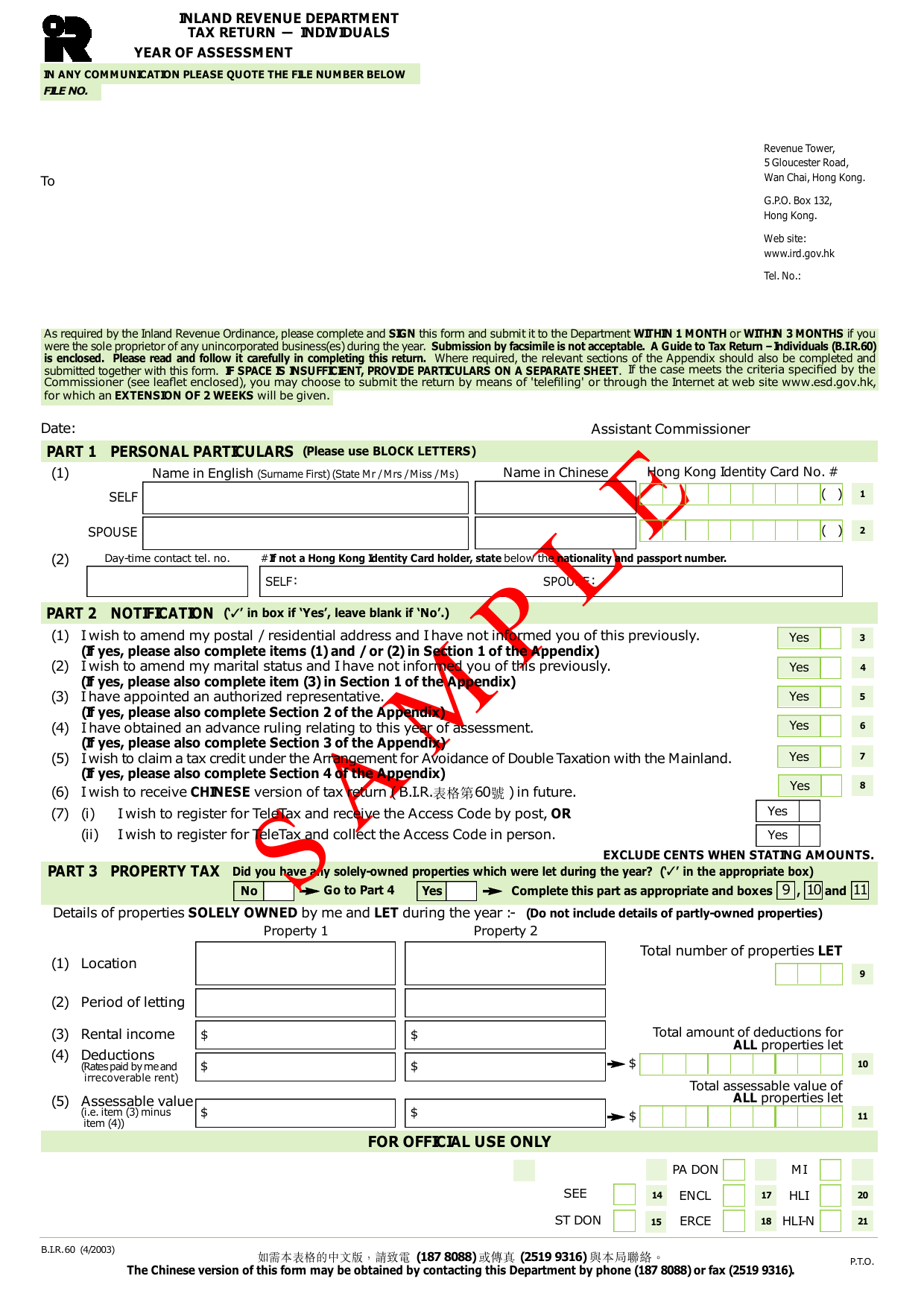
Page one of the official form. Every field named below appears on it in the same order.
PART 1 PERSONAL PARTICULARS
Boxes 1 and 2 are for you and your spouse. Enter your name in English (surname first, with title Mr/Mrs/Miss/Ms), your name in Chinese, and your Hong Kong Identity Card number. If you do not hold a Hong Kong Identity Card, state your nationality and passport number instead. The filer gets the Identity Card number from their own card. Box 2 is for your spouse’s details.
PART 2 NOTIFICATION
Tick the box for each statement that applies. Box 3: tick if you want to change your postal or residential address and have not told the IRD before. Box 4: tick to amend marital status. Box 5: tick if you have appointed an authorised representative. Box 6: tick if you obtained an advance ruling for this year. Box 7: tick to claim a tax credit under the Double Taxation Arrangement with the Mainland. Box 8: tick to receive future tax returns in Chinese. The two TeleTax registration options are mutually exclusive; tick only one.
PART 3 PROPERTY TAX
Tick “No” and go to Part 4 if you had no solely-owned let properties. Otherwise tick “Yes” and complete boxes 9, 10 and 11. Box 9: total number of properties let. For each property, enter location, period of letting, rental income, and deductions (rates paid by you and irrecoverable rent). Box 10: total deductions for all properties. Box 11: total assessable value (rental income minus deductions) for all properties.
PART 4 SALARIES TAX
Tick “No” and go to Part 5 if you had no salaries tax income. Otherwise complete this part. Box 22: grand total of all income accrued to you (excluding amounts in Part 4.2). Boxes 23-25: include selective items (share option gain, lump sum payments, commission income) that are part of the grand total. Box 26: amount to exclude due to relating back or exemption. Box 27: tick if you received income from an overseas company for Hong Kong employment. Box 28: tick if your employer paid salaries tax for you. Part 4.2: if your employer provided a place of residence, complete the table and box 29 (total value). Part 4.3: enter deductions for outgoings (box 30), self-education (box 31), charitable donations (box 32), and mandatory MPF contributions (box 33). Box 34: tick if you and your spouse elect joint assessment.
PART 5 PROFITS TAX
Tick “No” and go to Part 6 if you had no sole proprietorship businesses. Otherwise complete items (1) to (10) for each business. Boxes 35 and 43: Business Registration Number (from the BR certificate). Boxes 36 and 44: gross income. If gross income exceeds $500,000, attach accounts. Boxes 37 and 45: turnover. Boxes 38 and 46: gross profit/(loss). Boxes 39 and 47: net profit/(loss) per accounts. Boxes 40 and 48: assessable profits/(adjusted losses) before charitable donations. Boxes 41 and 49: approved charitable donations. Boxes 42 and 50: mandatory MPF contributions as a self-employed person. Boxes 42a and 50a: tick if you had transactions with a non-resident.
PART 6 PERSONAL ASSESSMENT
Tick “No” and go to Part 7 if you do not wish to elect Personal Assessment. Otherwise complete this part. Box 51: tick if you (and your spouse) are eligible and wish to elect. Box 52: tick if your spouse had assessable income. Box 53: number of partnership businesses. Box 54: approved charitable donations not claimed under Parts 4 and 5.
PART 7 DEDUCTION FOR INTEREST PAYMENTS
Complete this part only if you had salaries tax income or elect Personal Assessment. For each property, enter location, confirm loan secured by mortgage (tick “Yes”), and indicate if a re-mortgaged loan is involved (box 55, 63 or 71). Boxes 56, 64, 72: your share of ownership. Part 7.2: your share of interest to produce rental income (boxes 57, 65, 73). Part 7.3: home loan interest (boxes 58, 66, 74). If your spouse had no chargeable income, complete boxes 59-61, 67-69, 75-77. Boxes 62, 70, 78: tick if the property was your residence for the full year. Part 7.4: complete only if a re-mortgaged loan is involved.
PART 8 ALLOWANCES
Box 79: tick “Yes” if your spouse had salaries tax income, “No” otherwise. Box 80: tick if living apart and paying maintenance. Box 81: tick to claim disabled dependant allowance for your spouse. For child allowance, enter name, relationship (code “1” for child), and details for each child.
Download the current form - always file the version on the issuing authority's site, not a copy.
Sources
More on the forms library.