Form IR6104 application for a TIN for eTAX login and access code
Apply for your Hong Kong TIN and eTAX access with Form IR6104. Our guide walks you through the application and login setup.
IR6104 at a glance
- Official title
- Application for a TIN for eTAX Login and Access Code
- Issued by
- Inland Revenue Department
We link the issuing authority's own index rather than hosting a copy, because the form is revised there and an out-of-date copy is worse than none.
Form IR6104 Application for a TIN for eTAX Login and Access Code
Form IR6104 allows individuals and sole proprietorships to obtain a Tax Identification Number (TIN) and activate an eTAX account with the Inland Revenue Department. This form is the gateway to the IRD's digital platform, enabling taxpayers to file returns, view tax records, and communicate with the department electronically. Without it, a taxpayer cannot access the eTAX system.
Purpose of the Tax Identification Number
The Tax Identification Number (TIN) is the Inland Revenue Department's unique identifier for every Hong Kong taxpayer. For individuals, the TIN is their Hong Kong Identity Card number or, for those without one, a specific reference number issued by the IRD. For sole proprietorships, the TIN is the business registration number. This number is essential for all tax-related communications and filings with the IRD, including profits tax returns, salaries tax assessments and property tax matters. The IRD uses it to track your tax obligations and ensure accurate record-keeping.
What the eTAX Access Code Is For
The eTAX access code is a one-time activation code issued by the Inland Revenue Department to log in to the eTAX online services portal. After processing the IR6104 application, the IRD sends this code to the taxpayer's registered address or email. Use the code to create a login password and activate the account. Through the eTAX platform, you can file tax returns electronically, view assessment notices, check payment records and update personal particulars. The access code is valid for 30 days. After it expires, you must submit a new application. This process ensures only verified taxpayers access the system, protecting sensitive financial information.
How to Apply for a TIN in Hong Kong Using Form IR6104
To apply for a TIN, complete Form IR6104 and submit it to the Inland Revenue Department. The form requires your full name, Hong Kong Identity Card number (or passport number for non-residents), correspondence address and contact details. Sole proprietorships must also provide the business registration number. Submit the form by post or in person to the IRD's offices. The IRD will then process the application, issue the TIN and send the eTAX access code. Processing takes within 10 working days, though it may take longer during peak periods such as tax filing season.
Form IR6104 Download and Submission
Download Form IR6104 from the Inland Revenue Department's official website under the forms and publications section. The PDF form can be completed electronically or printed and filled in by hand. Ensure you obtain the latest version, as the IRD occasionally revises its forms. After completion, submit the paper form to the IRD's Taxpayer Services Division at the address specified on the form. The IRD does not currently accept electronic submission of Form IR6104. Keep a copy of the completed form and any supporting documents, such as a copy of your Hong Kong Identity Card.
Hong Kong Tax Identification Number for Sole Proprietorships
For a sole proprietorship, the Hong Kong tax identification number is the business registration number issued by the . When completing Form IR6104, the sole proprietor must provide both their personal TIN (usually their HKID number) and the business registration number. The eTAX account for a sole proprietorship is linked to the business, allowing the proprietor to file profits tax returns and manage the business's tax obligations. If the sole proprietor already has an individual eTAX account, they may need to apply for a separate business account using a new Form IR6104. The IRD treats the sole proprietorship as a separate taxpayer entity for tax purposes, even though the proprietor is personally liable for the business's tax debts.
Getting an eTAX Login IRD Account
To get an eTAX login IRD account, you must first submit Form IR6104. After the IRD processes the application and issues the access code, visit the eTAX portal and follow the activation instructions. You must enter the access code, create a login password and set up security questions for account recovery. Once activated, you can log in using your TIN and password. The eTAX system supports multiple accounts for individuals with both personal and business tax obligations. The login password must be changed periodically for security purposes; the IRD provides guidance on password requirements on its website.
Identity Verification and Account Activation
Identity verification is a critical step. The Inland Revenue Department cross-references the information on Form IR6104 with its existing records. For individuals, this means checking the Hong Kong Identity Card number and name against the Immigration Department's database. For sole proprietorships, the IRD verifies the business registration number with the . If the information does not match, the application will be rejected, and you must resubmit with corrected details. Account activation occurs after you use the access code within its 30-day validity period. If the code expires, you must submit a new Form IR6104 to obtain a fresh one.
Using the eTAX Online Services
Once activated, your eTAX account provides access to a range of Inland Revenue Department online services. These include filing tax returns, viewing tax assessments, checking payment status and updating personal or business particulars. The eTAX portal also allows secure messaging with the IRD, reducing the need for postal correspondence. For businesses, the eTAX system integrates with the Business Tax Portal for electronic filing of profits tax returns and supplementary forms. The IRD encourages all taxpayers to use eTAX, as it reduces processing times and provides immediate confirmation of submissions.
Common Issues and Solutions
Applicants may encounter issues when completing Form IR6104. Common problems include providing incorrect personal details, submitting incomplete forms or using an expired access code. Double-check all information before submission to avoid delays. If the access code expires, submit a new Form IR6104 application. If the IRD rejects the application due to identity verification issues, contact the Taxpayer Services Division for guidance. The IRD provides a helpline for eTAX-related queries, and taxpayers can also visit the IRD's offices in person for assistance. Keep a record of the application date and any correspondence with the IRD.
How to fill out Form IR6104
Page one of the official form. Every field named below appears on it in the same order.
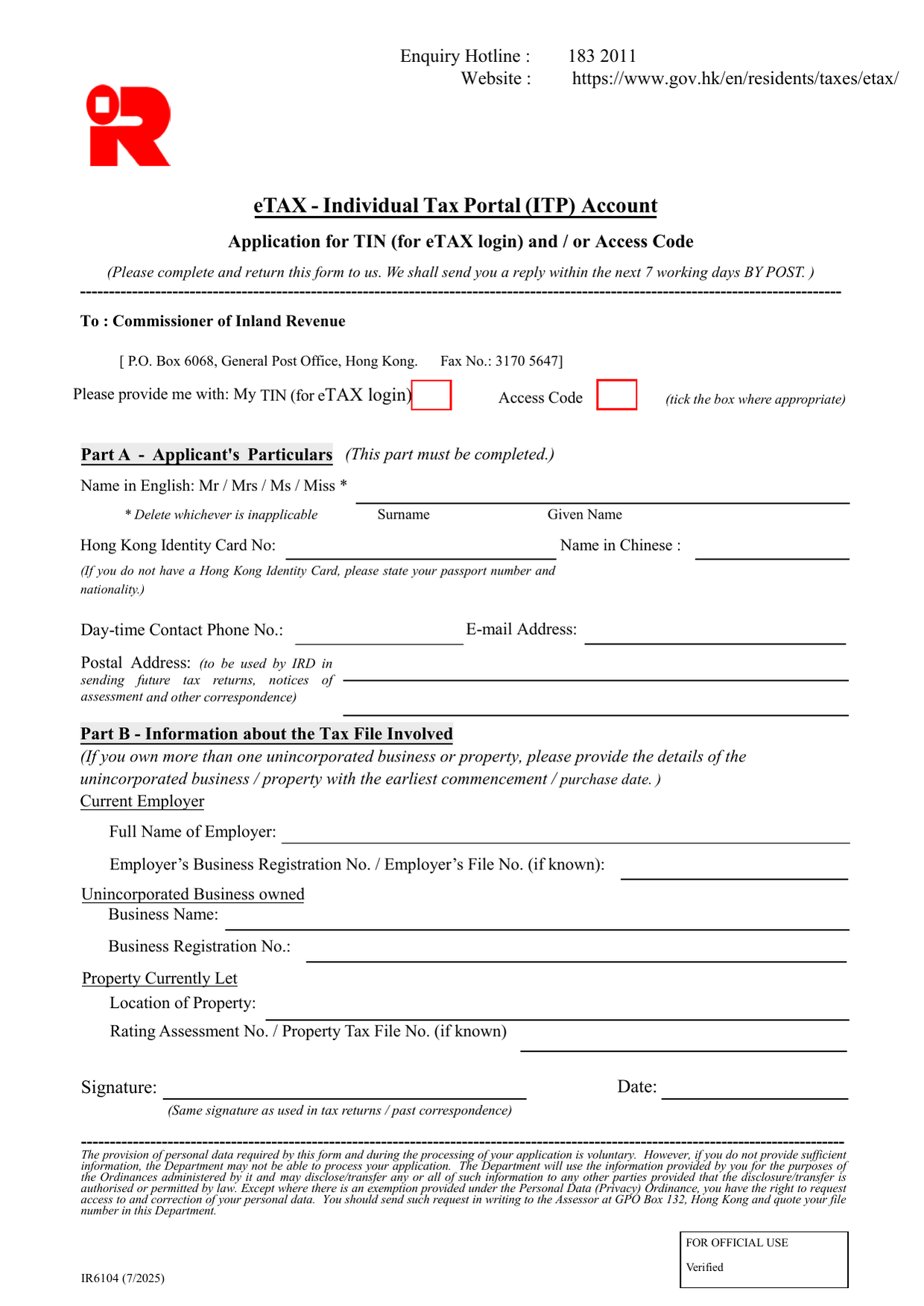
Part A - Applicant's Particulars (This part must be completed.)
Name in English Select the appropriate title (Mr / Mrs / Ms / Miss) and delete the others. Write your surname and given name exactly as they appear on your Hong Kong Identity Card.
Hong Kong Identity Card No. Enter your HKID number, including the bracketed check digit. If you do not hold a HKID, enter your passport number and state your nationality in the space provided.
Name in Chinese Provide your full name in Chinese characters. If you have no registered Chinese name, leave this box blank.
Day-time Contact Phone No. Give a phone number where you can be reached during business hours. Include the area code.
E-mail Address Provide a valid email address. This will be used for correspondence about your application.
Postal Address Write your full postal address. The Inland Revenue Department will use this address to send tax returns, notices of assessment and other correspondence. Ensure it is current and accurate.
Part B - Information about the Tax File Involved
This section asks for details of the tax file you need to link to your eTAX account. If you own more than one unincorporated business or property, provide details for the one with the earliest commencement or purchase date.
Current Employer - Full Name of Employer - Enter the employer’s registered name. - Employer’s Business Registration No. / Employer’s File No. (if known) - Provide the BR number (from the BR certificate) or the Inland Revenue file number if you have it. This is not required if you are not currently employed.
Unincorporated Business owned - Business Name - The name under which you operate the sole proprietorship or partnership. - Business Registration No. - The number shown on the Business Registration certificate.
Property Currently Let - Location of Property - Provide the full address of the rental property. - Rating Assessment No. / Property Tax File No. (if known) - The Rating and Valuation Department number or the IRD property tax file number can be found on past tax correspondence or rate demand notes.
Signature and Date
Sign using exactly the same signature you use on tax returns and past correspondence. Date the form on the day you sign.
Mutual Exclusivity and Common Mistakes
- The three tick-boxes at the top are mutually exclusive: you may tick only one - either “My TIN (for eTAX login)” or “Access Code” or both, as instructed. Tick at least one.
- Dates must be the actual date of signing, not backdated. No other date appears on this form.
- The postal address you give must be the same as the one IRD holds for your tax file; otherwise processing may be delayed.
- If you tick the wrong option or leave Part A incomplete, the application will be rejected.
No continuation sheet is provided or mentioned. Do not attach extra pages unless asked. No fee is stated. No deadline applies - the form is submitted as needed.
Download the current form - always file the version on the issuing authority's site, not a copy.
Sources
More on the forms library.