Form IR1121 Application for Holdover of Provisional Tax
Apply to holdover your provisional tax payment in Hong Kong using our guide to Form IR1121 and its eligibility criteria.
IR1121 at a glance
- Official title
- Application for Holdover of Provisional Tax
- Issued by
- Inland Revenue Department
We link the issuing authority's own index rather than hosting a copy, because the form is revised there and an out-of-date copy is worse than none.
Form IR1121 Application for Holdover of Provisional Tax
The Form IR1121 application for holdover of provisional tax is the official document used by taxpayers in Hong Kong to request that the Inland Revenue Department suspend or reduce a provisional tax payment. Provisional tax is collected in advance of the final assessment for a year of assessment, based on the tax payable for the preceding year. When a taxpayer expects their actual tax liability for the current year to be lower than the provisional tax assessed, they may apply for a holdover using this form. The Inland Revenue Department will consider the application only if the taxpayer meets specific statutory grounds and submits the form within the prescribed time.
Provisional Tax Holdover Hong Kong
Provisional tax is a feature of the Hong Kong tax system under the Inland Revenue Ordinance (Cap. 112). For profits tax, salaries tax and property tax, the Inland Revenue Department issues a demand for provisional tax alongside the final assessment for the preceding year of assessment. The amount of provisional tax is generally equal to the tax assessed for the previous year, adjusted for any tax reduction announced in the Budget.
A taxpayer who expects their actual tax liability for the current year of assessment to be lower than the provisional tax assessed may apply for a holdover. The holdover suspends payment of the provisional tax, or part of it, until the final assessment for that year is issued. If the taxpayer's actual liability turns out to be higher than the amount held over, the balance becomes payable with interest.
The application is made on Form IR1121, which is available from the Inland Revenue Department's website. The form requires the taxpayer to state the grounds for the holdover and to provide supporting evidence.
Reduce Provisional Tax Payment HK
To reduce a provisional tax payment in Hong Kong, the taxpayer must demonstrate that the estimated profits or income for the current year of assessment will be less than the amount on which the provisional tax was calculated. The reduction is not automatic; the taxpayer must apply and provide a reasonable estimate.
The Inland Revenue Department will consider a reduction only if the estimated tax payable for the current year is at least 10% lower than the provisional tax assessed. If the estimate is accepted, the department will issue a revised demand for a reduced amount. The taxpayer must still pay the reduced provisional tax by the original due date, unless a holdover is also granted.
A taxpayer who wishes to reduce the provisional tax payment should complete Part B of Form IR1121, providing details of the estimated profits or income and the estimated tax payable. Supporting documents, such as management accounts or profit and loss statements, should accompany the application.
Form IR1121 Application Guide
The Form IR1121 application guide covers the steps to complete and submit the form correctly. The form is divided into several parts:
- Part A: Taxpayer identification details, including the tax file number, name and address.
- Part B: Grounds for holdover. The taxpayer must select one or more of the permitted grounds and provide supporting information.
- Part C: Estimated profits or income for the current year of assessment, with a calculation of the estimated tax payable.
- Part D: Declaration and signature by the taxpayer or the authorised tax representative.
The form must be signed by the taxpayer or by a person authorised in writing to act on the taxpayer's behalf. If a tax representative signs, a copy of the authorisation (such as Form IR831) should be attached.
The completed form should be submitted to the Inland Revenue Department by post or through the Business Tax Portal. The department recommends using the portal for faster processing. The taxpayer should retain a copy of the form and any supporting documents.
Applying for Provisional Tax Relief
Applying for provisional tax relief means requesting that the Inland Revenue Department hold over or reduce the provisional tax payment. The application must be made before the due date for payment of the provisional tax, or within 14 days after the due date if the taxpayer can show reasonable cause for the delay.
The Inland Revenue Department will not accept an application that is made solely because the taxpayer cannot pay the tax. The grounds must relate to a change in the taxpayer's circumstances that will reduce the actual tax liability for the year.
The taxpayer should also note that a holdover application does not stop the Inland Revenue Department from issuing a demand for payment. If the application is rejected, the provisional tax remains payable, and interest may be charged on any amount paid late.
IR1121 Eligibility Criteria
The eligibility criteria for using Form IR1121 are set out in section 63J of the Inland Revenue Ordinance (Cap. 112). The taxpayer must satisfy one or more of the following grounds for holdover:
- Estimated profits or income lower than the preceding year: The taxpayer expects the assessable profits or income for the current year of assessment to be less than those for the preceding year.
- Estimated tax payable lower than provisional tax: The estimated tax payable for the current year, after applying any tax reduction, is less than the provisional tax assessed.
- Cessation of trade, profession or business: The taxpayer has ceased or will cease the trade, profession or business before the end of the year of assessment.
- Change in personal circumstances: For salaries tax, the taxpayer has become entitled to a higher level of allowances or deductions, such as those for dependants or charitable donations.
- Objection pending: The taxpayer has lodged a valid objection against the assessment for the preceding year, and the objection has not yet been determined.
The taxpayer must provide evidence to support the ground claimed. For example, if the ground is lower estimated profits, the taxpayer should submit management accounts or a profit forecast. If the ground is a pending objection, the taxpayer should provide the notice of objection (Form IR831) and the date it was lodged.
The Inland Revenue Department will review the application and may request further information. If the application is approved, the department will issue a revised notice of assessment showing the amount of provisional tax held over. The taxpayer must pay the remaining provisional tax by the original due date.
How to fill out Form IR1121
Page one of the official form. Every field named below appears on it in the same order.
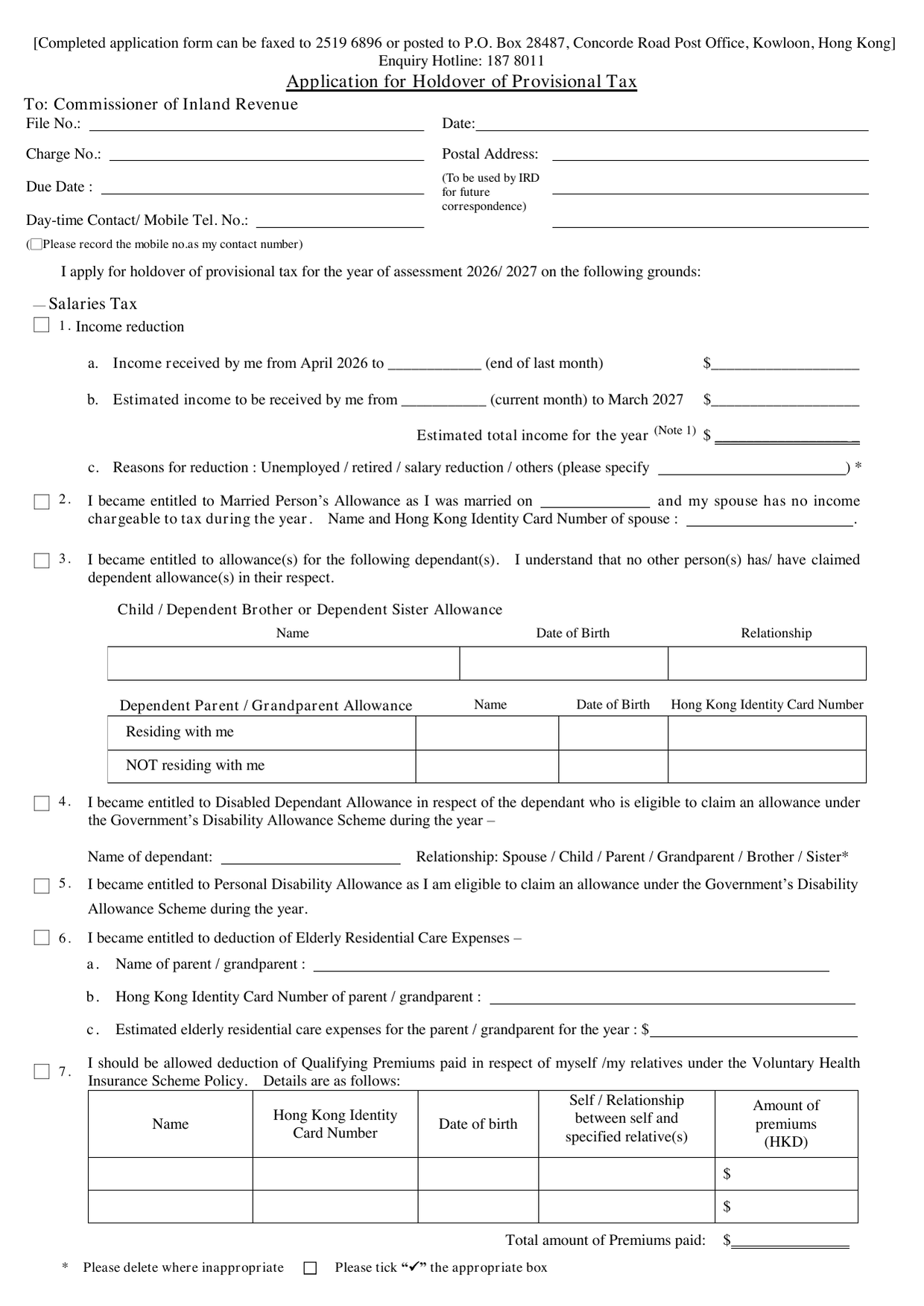
File No., Date, Charge No., Postal Address, Due Date
These boxes are for IRD use. Leave them blank.
Day-time Contact / Mobile Tel. No.
Enter a telephone number where you can be reached during the day. Tick the box if you want this mobile number recorded as your contact number for future correspondence.
Year of Assessment
Strike out the year that does not apply. The form shows 2026/2027. Most filers will apply for the coming year.
Grounds for Holdover - Salaries Tax
Box 1 - Income reduction - Line (a): Enter total income received from April 2026 to the last day of the month that just ended. Write the end date of that month on the line. - Line (b): Enter estimated income from the current month to March 2027. Write the current month on the line. - Add (a) and (b) for estimated total income. Write it in the box labelled "Estimated total income for the year". - Line (c): Tick the reason for the reduction. If "others", specify. Note 1: Unless your employment ceased during the year, the estimated total must be less than 90% of your previously assessed income.
Box 2 - Married Person's Allowance Only tick if you married during the year and your spouse has no chargeable income. Enter spouse's name and HKID number.
Box 3 - Dependent Allowances Provide name, date of birth, and relationship for each dependant. Tick whether the dependant resides with you. Common mistake: only one person may claim the same dependant. Confirm no one else has claimed.
Box 4 - Disabled Dependant Allowance Enter dependant's name and relationship. The dependant must be eligible under the Government's Disability Allowance Scheme.
Box 5 - Personal Disability Allowance Tick if you personally are eligible under the Disability Allowance Scheme.
Box 6 - Elderly Residential Care Expenses Enter parent/grandparent name, HKID, and estimated expenses for the year.
Box 7 - Voluntary Health Insurance Scheme Premiums Provide details of each qualified policy: name, HKID, date of birth, relationship, premium amount. Total premiums paid goes in the bottom box.
Box 8 - Qualifying Annuity Premiums (self as annuitant) Enter the amount.
Box 9 - Qualifying Annuity Premiums (spouse as annuitant) Enter the amount.
Box 10 - Tax Deductible MPF Voluntary Contributions Enter the amount.
Box 11 - Home Loan Interest / Domestic Rents - Location of residence: full address. - Home Loan Interest: period you reside; estimated HLI payments (your share and spouse's share). Tick if you reside with a child born on or after 25 October 2023. Tick if spouse nominates you. - Domestic Rents: period of qualifying tenancy; number of contracting tenants; tick who is a contracting tenant; estimated total DR and your claimed share. Tick if you reside with a child born on or after 25 October 2023.
Spouse's signature required for HLI nomination and DR allocation (see Note 3 and Note 4).
Property Tax
Tick the applicable reason (sold, vacant, self-occupied, let at reduced rent). Enter estimated rental income for the year. Full property address required.
Profits Tax
Enter Business Registration Number. State cessation date or tick reduced profits. Enter estimated profits. Attach certified accounts and tax computation.
Supplementary Information
Use this box for late application reasons or other grounds not listed.
Signature
The applicant signs and prints name. The applicant's spouse signs and prints name if any of the spouse sections apply.
Download the current form - always file the version on the issuing authority's site, not a copy.
Sources
More on the forms library.