Form IR76C Election for Personal Assessment Hong Kong
File Form IR76C to elect for personal assessment and claim deductions and allowances in Hong Kong.
IR76C at a glance
- Official title
- Election for Personal Assessment and Claim for Deductions and Allowances
- Issued by
- Inland Revenue Department
We link the issuing authority's own index rather than hosting a copy, because the form is revised there and an out-of-date copy is worse than none.
Form IR76C Election for Personal Assessment Hong Kong
Filing the form IR76C election for personal assessment Hong Kong formally requests the Inland Revenue Department (IRD) to compute all your income under one assessment. The standard system assesses salaries tax and profits tax separately, with property tax assessed on its own. Each head of charge has its own rates and deduction rules. Personal assessment consolidates these incomes. This can lower your total tax bill when one income source produces a loss or when your combined deductions exceed the limits for any single tax type.
Who Benefits From Electing Personal Assessment
Personal assessment is not always advantageous. The election makes sense for individuals who:
- Have profits tax losses from a sole proprietorship or partnership that could offset salaries or rental income.
- Receive rental income (chargeable to property tax) and also have mortgage interest or other property-related deductions that are more valuable when aggregated with other income.
- Are resident individuals who want to claim allowances and deductions that standard property tax or profits tax regimes do not permit, such as the basic allowance, child allowance or elderly residential care expenses.
- Pay tax under profits tax at the standard rate (currently 16.5% for corporations, but the progressive rate applies to unincorporated businesses at lower profits levels) and would pay less under the progressive salaries tax rates applied to total income.
A taxpayer must be an individual, either resident or non-resident, who is chargeable to tax under any of the three heads. Married couples can elect jointly, and the election covers the couple’s aggregate income.
IR76C Form Personal Assessment Step by Step
The IR76C form personal assessment is a single-page IRD document. You complete it and return it within the specified time. The form requires:
- Personal particulars (name, Hong Kong Identity Card number, correspondence address).
- A declaration of the year of assessment for which the election is made.
- Confirmation that you are chargeable to tax under at least one of the three heads (salaries, profits or property) for that year.
- Where applicable, a joint election by a married couple, with both parties signing the form.
The IRD does not ask you to recalculate the tax on the form itself. You simply make the election, and the department performs the tax computation using the data already provided in your relevant tax returns (BIR60, BIR52 or BIR57/BIR58). The inland revenue ir76c is therefore a stand-alone election form, not a substitute for the separate tax returns.
The form is available for download from the Inland Revenue Department website. The IRD also accepts electronic submission through the e-tax portal for taxpayers who have registered for the service.
Hong Kong Personal Assessment Election - When to File
The hong kong personal assessment election must be made within the time limits set by section 41 of the Inland Revenue Ordinance (Cap. 112). The standard rule is:
- For a year of assessment, the election must be filed no later than the deadline for the individual tax return (BIR60) for that year, or within one month after the date of the notice of assessment, whichever is later.
- A taxpayer who has already received an assessment can still elect within the period allowed for objecting to that assessment.
- An election made late may be accepted by the IRD if the taxpayer can show a reasonable excuse for the delay.
The IRD typically issues BIR60 in April each year for the preceding year of assessment. For example, for the year of assessment 2025/26, the return would be issued around April 2026, with a filing deadline of about one month. The election should accompany or precede that return.
Claim Deductions Personal Assessment - What Can Be Consolidated
When you file the election and the IRD processes the claim deductions personal assessment, the department aggregates all chargeable income from salaries, profits and property, then deducts:
- All allowable expenses and losses from each source.
- Personal allowances (basic, married, child, dependent parent, single parent, disabled dependant, and others).
- Charitable donations (subject to the minimum amount and the 35% limit for the year).
The resulting net chargeable income is then taxed at the progressive rates that apply to salaries tax. The tax payable is the lower of:
- The amount calculated under personal assessment using progressive rates.
- The total of the separate taxes that would have been payable without the election.
This comparison ensures that personal assessment never increases the tax burden; it only reduces it where the standard separate assessment would produce a higher total.
Practical Filing Steps
- Complete the standard tax return for each source of income (BIR60 for salaries, BIR52 for profits if you are a sole proprietor or partnership, and BIR57/BIR58 for property).
- Download the IR76C from the IRD website or collect a paper copy from the department.
- Fill in the form, indicating whether the election is individual or joint.
- Submit the form together with the tax return(s) or separately within the allowed period.
- The IRD issues a composite assessment notice showing the personal assessment calculation. If the result is lower than separate assessments, the department refunds the difference.
A taxpayer who has elected personal assessment in a previous year does not need to file a fresh election every year. The election remains in force for subsequent years unless the taxpayer withdraws it in writing. Withdrawal is also done using the IR76C, by marking the appropriate box.
Consequences of Not Electing
Without the election, a profits tax loss from a sole proprietor business cannot offset salaries tax on employment income or property tax on rental income. Similarly, rental expenses such as mortgage interest are deductible only against property tax, and any surplus loss is ring-fenced. The election bridges those separate pools, allowing losses and deductions to flow across categories. This is particularly valuable in the early years of a business when losses are common, or when a taxpayer owns let property subject to interest-rate changes.
How to fill out Form IR76C
Page one of the official form. Every field named below appears on it in the same order.
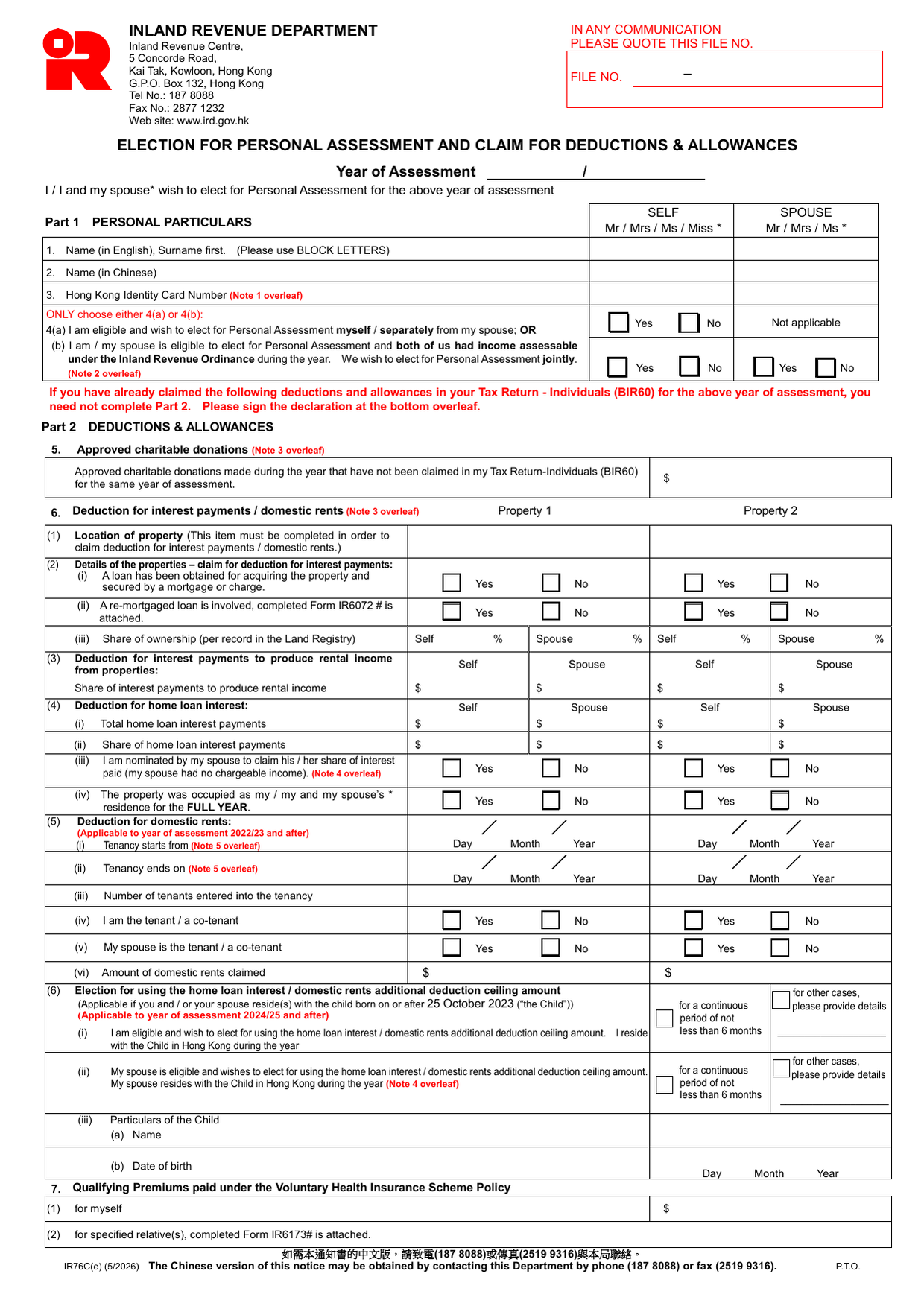
Part 1: Personal Particulars
State your year of assessment at the top (e.g. 2024/25). Delete “I” or “I and my spouse” as applicable. Use the columns for Self and Spouse.
1. Name (in English) - Surname first, in BLOCK LETTERS.
2. Name (in Chinese) - Optional but helps the Department match records.
3. Hong Kong Identity Card Number - If you do not have one, write your Passport Number and Nationality (see Note 1).
4(a) or 4(b) - Choose only one. Tick Yes/No/Not applicable in the correct column.
- 4(a) means you elect alone or separately from your spouse.
- 4(b) means both of you had assessable income and elect jointly. Your spouse must agree (Note 2).
Part 2: Deductions & Allowances
Do not complete Part 2 if you already claimed these items in your BIR60. Otherwise:
5. Approved charitable donations - Enter the amount not yet claimed in BIR60. Keep receipts (Note 3).
6. Deduction for interest payments / domestic rents - Complete for up to two properties.
- (1) Location is mandatory to claim.
- (2)(i)-(ii) Tick yes/no for mortgage existence and whether a re-mortgage form IR6072 is attached.
- (2)(iii) Enter ownership shares from Land Registry.
- (3)-(4) Split interest amounts between Self and Spouse.
- (4)(iii) If your spouse has no income and nominates you to claim their share, they must sign the declaration (Note 4).
- (4)(iv) Tick yes only if the property was your residence for the FULL year.
- (5) Domestic rents (2022/23 onward): fill tenancy start/end dates, number of tenants, and who is tenant/co-tenant.
- (6) Additional deduction for residing with a child born on/after 25 October 2023 (2024/25 onward). Provide child’s name and date of birth.
7. Qualifying Premiums (VHIS) - Enter amount for yourself. For specified relatives, attach Form IR6173.
8. Assisted Reproductive Service Expenses - Enter amount (2024/25 onward). Keep receipts.
9. Qualifying Annuity Premiums & TVC -
- (1)(i) Tick yes if you hold a TVC account.
- (1)(ii) Enter deductible MPF voluntary contributions.
- (2)(i)-(ii) Enter annuity premiums paid for self or spouse.
10. Married person’s allowance & personal disability allowance -
- (1) Tick yes if you apply.
- (2) Enter maintenance fees paid if living apart.
- (3) Tick yes if eligible for Disability Allowance Scheme.
11. Child allowance / dependent brother or sister allowance - For each dependant, enter name, relationship, date of birth, and code (1 for full-time student aged 18-25, 2 for incapacitated over 18). For a brother/sister, also provide their parents’ names and ID numbers.
12. Single parent allowance - Tick only if single/divorced/widowed/living apart all year. Enter “1” for full year, “2” for part.
13. Dependent parent/grandparent allowance & elderly residential care expenses -
- Complete EITHER (5) or (6).
- (5) Tick whether dependant lived with you (full year or at least 6 months) without paying full cost, or you contributed at least $12,000.
- (6) Provide care home name and expenses paid.
- (7) Tick yes if dependant under 60 and eligible for Disability Allowance.
14. Disabled dependant allowance - Name, relationship, and tick yes if eligible for Disability Allowance.
Declaration
Write your Hong Kong Identity Card number and sign. If your spouse is involved in joint election or nomination under item 6(4)(iii) or 6(6)(ii), they must also sign. Add a daytime contact phone number and date. Keep supporting documents (Notes 3, 5).
Download the current form - always file the version on the issuing authority's site, not a copy.
Sources
More on the forms library.