Form IRSD141 Request for Withdrawal of an E-Stamping Application
Need to withdraw an e-stamping application? This guide explains how to use Form IRSD141 to request a withdrawal from the Hong Kong Stamp Office.
IRSD141 at a glance
- Official title
- Request for Withdrawal of an e-Stamping Application, Share Transfer
- Issued by
- Inland Revenue Department
We link the issuing authority's own index rather than hosting a copy, because the form is revised there and an out-of-date copy is worse than none.
Form IRSD141 Request for Withdrawal of an E-Stamping Application
Use Form IRSD141 Request for Withdrawal of an E-Stamping Application to cancel a submitted e-stamping application before the Stamp Office processes it and issues the stamp certificate. This form is used when a share transfer or other instrument submitted through the e-Stamp system is no longer required, or when errors in the application need correction before stamping is completed. The Hong Kong e-stamping withdrawal form is a specific document for this purpose and must be used to formally notify the Stamp Office of the change in circumstances.
When to Use IRSD141 to Withdraw an E-Stamping Application
Submit Form IRSD141 to the Stamp Office of the Inland Revenue Department (IRD) to withdraw an e-stamping application that has been lodged but not yet finalised. Common reasons include:
- The underlying share transfer transaction has been cancelled or abandoned
- Errors were discovered in the application details, such as incorrect consideration amounts or wrong parties
- The instrument was submitted in error and a fresh application is needed
- The parties have decided to restructure the transaction
You must make the withdrawal request before the Stamp Office issues the stamp certificate. Once stamping is completed, you cannot use IRSD141; instead, you would need to apply for cancellation of the stamp certificate using Form IRSD140. An exception to this timing rule may apply if the Stamp Office has assessed the duty but not yet issued the certificate; in such cases, you should contact the Stamp Office directly to inquire about the possibility of withdrawal. If the withdrawal is submitted after the certificate is issued, the request will be rejected, and the standard cancellation process must be followed.
IRSD141 Withdraw E-Stamping Application: Step-by-Step Guide
Follow these steps to complete the IRSD141 withdraw e-stamping application process:
-
Log into your e-Stamp account on the IRD's e-Stamp portal. An active e-Stamp account is required to initiate the withdrawal.
-
Locate the application you wish to withdraw. The system displays all pending applications associated with your account.
-
Complete Form IRSD141 with the following information: - The e-Stamping application reference number - The date of the original application - The reason for withdrawal - Your contact details and signature
-
Submit the form through the e-Stamp system or by email to the Stamp Office, as instructed on the form.
-
Await confirmation from the Stamp Office. The IRD will process the request and notify you of the outcome. If the request is denied, the notification will explain the reason, such as the application's status having changed to "processed" or "stamped".
Cancel E-Stamping Application IRSD141: Submission Requirements
When you cancel e-stamping application IRSD141, the Stamp Office requires:
- The application must be in a "pending" status, meaning no stamp certificate has been issued
- The request must come from the person who submitted the original application or an authorised representative
- A clear reason for the withdrawal must be stated
- If the application was submitted by a tax representative, the representative must submit the withdrawal request
The Stamp Office may refuse a withdrawal request if the application has already been processed or if stamp duty has been assessed and paid. In such cases, you would need to pursue a refund through a separate process. An authorised representative must provide a letter of authorisation from the original applicant when submitting the withdrawal request on their behalf. Failure to provide this documentation will result in the request being rejected.
E-Stamping Withdrawal Request: Submission Process
Submit the e-stamping withdrawal request through the IRD's e-Stamp system. The process works as follows:
- Access your e-Stamp account at the IRD website
- Navigate to the "Withdrawal Request" section
- Select the application you wish to withdraw
- Complete the electronic version of Form IRSD141
- Attach any supporting documents if required
- Submit the request electronically
The Stamp Office typically processes withdrawal requests within a few working days. You will receive a confirmation message through the e-Stamp system once the withdrawal is approved. If the request is submitted outside of standard processing hours, it will be queued for the next business day. If the system encounters an error during submission, retain the application reference number and contact the Stamp Office for assistance.
Fees and Refunds
There is no fee for submitting Form IRSD141. However, if stamp duty has already been paid on the application, the withdrawal does not automatically trigger a refund. You must apply separately to the Stamp Office for a refund of stamp duty if the transaction did not proceed. The IRD will consider refund applications on a case-by-case basis, and you should provide evidence that the instrument was not used or that the transaction was cancelled. Supporting evidence may include a signed declaration from the parties confirming the transaction's cancellation or a copy of the rescinded agreement. The refund process is distinct from the withdrawal process and is subject to its own conditions and approval timeline.
Related Forms
- Form IRSD140: Request for Cancellation of a Stamp Certificate (for already-stamped instruments)
- Form IRSD142: Stamping Request for a Share Transfer (for new e-stamping applications)
- Form IRSD109: Application to Open an E-Stamp Account
For the latest version of Form IRSD141, visit the Inland Revenue Department's forms index at https://www.ird.gov.hk/eng/paf/bus.htm. Always use the current version from the IRD website, as forms are revised periodically.
How to fill out Form IRSD141
Page one of the official form. Every field named below appears on it in the same order.
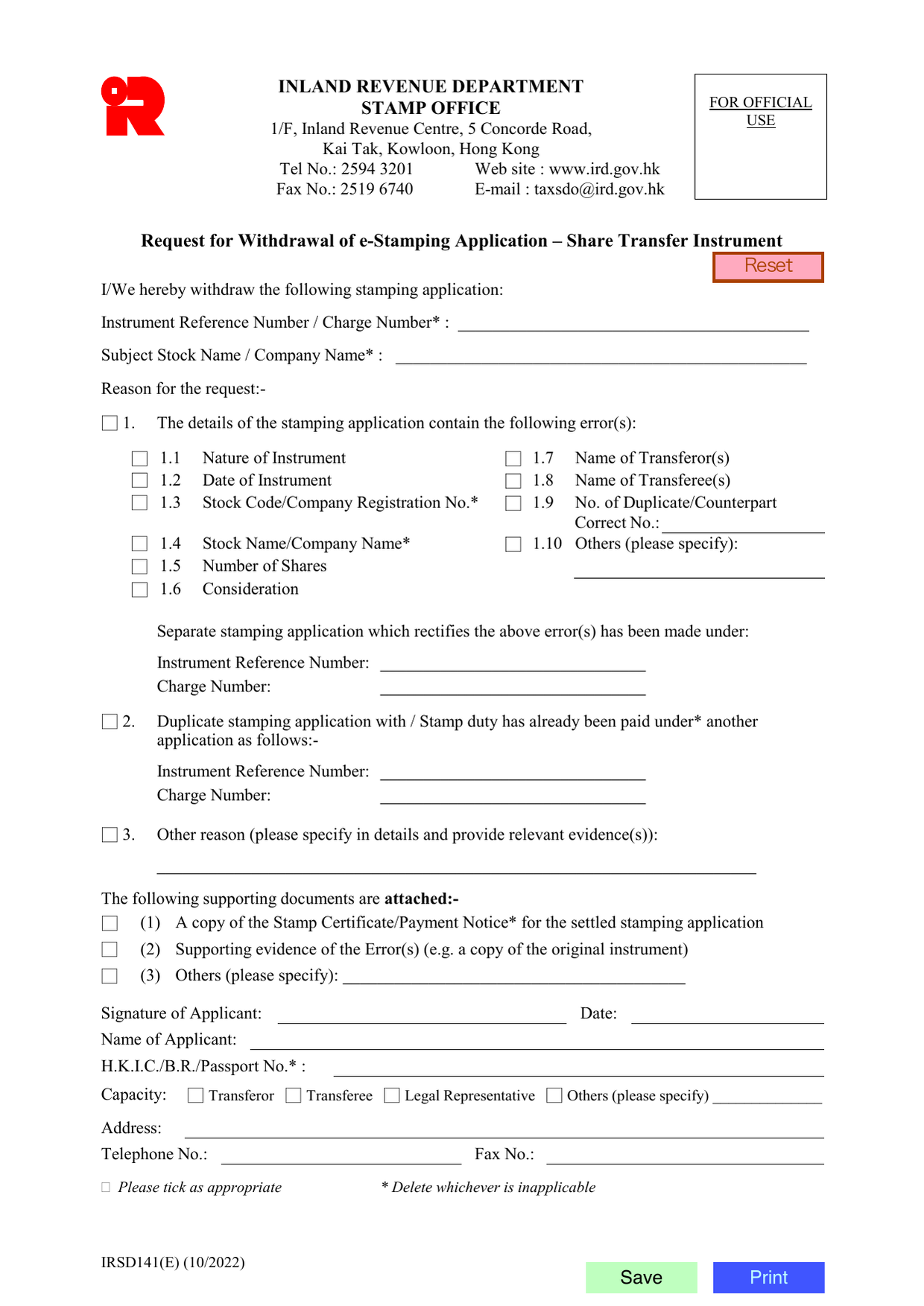
1. Instrument Reference Number / Charge Number
Enter the Instrument Reference Number or the Charge Number of the stamping application you want to withdraw. Strike out the option that does not apply. You can find this number on the original e-Stamping acknowledgment or payment receipt.
2. Subject Stock Name / Company Name
Enter the name of the stock or company that appears on the existing stamping application. Strike out “Stock Name” or “Company Name” as appropriate.
3. Reason for the Request
Tick one of the three boxes (1, 2, or 3) and complete the corresponding sub-fields.
Box 1 - Error in the application Tick this box if the original application contains a mistake. Then tick the specific error(s):
- 1.1 Nature of Instrument
- 1.2 Date of Instrument
- 1.3 Stock Code / Company Registration No.
- 1.4 Stock Name / Company Name
- 1.5 Number of Shares
- 1.6 Consideration (the price paid)
- 1.7 Name of Transferor(s)
- 1.8 Name of Transferee(s)
- 1.9 Number of Duplicate/Counterpart - also write the correct number in the “Correct No.” line.
- 1.10 Others - describe the error if it does not fit the categories above.
After ticking the error(s), you must provide the reference of the corrected re-submission:
- Instrument Reference Number of the new application, or
- Charge Number of the new application.
Strike out whichever does not apply. The new number must match the corrected e-Stamping application you have already filed.
Box 2 - Duplicate application or duty already paid Tick this box if you accidentally submitted more than one application for the same transfer, or if stamp duty was already paid under another application. Provide the Instrument Reference Number or Charge Number of the earlier application that is correct. Strike out the irrelevant label.
Box 3 - Other reason Tick this box only if the reason is not an error or a duplicate. Write the reason in the space provided and attach relevant evidence (for example, a rescission letter or court order).
4. Attachments
Tick at least one of the three supporting-document boxes:
- (1) A copy of the Stamp Certificate or Payment Notice for the application being withdrawn (the one you want to cancel).
- (2) Supporting evidence of the errors listed in Box 1 (e.g. a copy of the original share transfer instrument showing the correct details).
- (3) Other attachments - describe what they are in the blank.
5. Applicant Details
The person signing must be the party who made the original stamping application.
- Signature of Applicant - the person signs here.
- Date - the date of signing.
- Name of Applicant - in block letters.
- H.K.I.C./B.R./Passport No. - Hong Kong Identity Card, Business Registration number, or Passport number. Strike out the two that do not apply.
- Capacity - tick one: Transferor, Transferee, Legal Representative, or “Others” (specify the relationship).
- Address - full correspondence address.
- Telephone No. and Fax No. - contact numbers.
Common trap: If you tick Box 1, you must also fill in the separate “Instrument Reference Number” or “Charge Number” for the corrected application. Omitting that number will delay processing.
6. Save and Print
Use the on-screen “Save” button to keep a copy before printing. The printed form must be signed and dated in ink.
Download the current form - always file the version on the issuing authority's site, not a copy.
Sources
More on the forms library.