Form IR1333 electronic tax reserve certificates redemption form
Our guide to Form IR1333 explains how to redeem your Electronic Tax Reserve Certificates for tax payment or refund in Hong Kong.
IR1333 at a glance
- Official title
- Electronic Tax Reserve Certificates Redemption Form
- Issued by
- Inland Revenue Department
We link the issuing authority's own index rather than hosting a copy, because the form is revised there and an out-of-date copy is worse than none.
Form IR1333 Electronic Tax Reserve Certificates Redemption Form
The Form IR1333 electronic tax reserve certificates redemption form is the official document used to request redemption of an Electronic Tax Reserve Certificate (eTRC) held with the Hong Kong Inland Revenue Department (IRD). This form allows certificate holders to surrender their eTRCs for a refund of the principal amount plus accrued interest, or to apply the certificate value against a tax liability. The redemption procedure is governed by the Inland Revenue Ordinance (Cap. 112) and must be submitted through the IRD's eTAX system.
Redeem Tax Reserve Certificate Hong Kong
Tax reserve certificates are instruments issued by the IRD that allow taxpayers to set aside funds in advance of their tax liabilities. An eTRC is the electronic version, purchased through the Electronic Tax Reserve Certificates Scheme using Form IR1306. When you hold an eTRC and need to access the funds, you submit Form IR1333 to initiate the certificate surrender. The IRD will process the redemption and either refund the amount to your designated bank account or apply it against an outstanding tax assessment.
The redemption procedure applies to both individuals and businesses holding eTRCs. The certificate holder must be the person named on the certificate, and the redemption request must comply with the IRD's signature requirements for electronic submissions.
IRD Form IR1333
Form IR1333 is published by the Inland Revenue Department and is accessible through the eTAX portal. The form code is specific to electronic tax reserve certificate redemptions and should not be confused with other IRD forms. To locate the form, log into your eTAX account, navigate to the "Tax Reserve Certificates" section, and select "Redeem Certificate." The system will present an electronic version of Form IR1333 for completion.
The form requires you to enter certificate particulars, including the certificate number, issue date, and face value. If you hold multiple eTRCs, you may need to redeem them individually or in batches, depending on the IRD's current processing guidelines.
Electronic Tax Reserve Certificate Redemption
The Electronic Tax Reserve Certificate redemption process is fully digital. Once you submit Form IR1333 through eTAX, the IRD processes the request and verifies the certificate holder's identity. The certificate is then surrendered, and the proceeds are calculated based on the principal amount plus any accrued interest up to the redemption date.
Interest on eTRCs accrues at a rate determined by the Financial Secretary and published in the Gazette. The IRD will compute the interest and include it in the redemption payment. The processing time for electronic redemption is generally faster than for paper-based certificates, often completed within 21 working days.
How to Redeem Tax Reserve Certificate
To redeem a tax reserve certificate, follow these steps:
- Log into the eTAX portal using your Tax Identification Number (TIN) and eTAX access code. If you do not have an account, you must first register using Form IR6104.
- Select "Tax Reserve Certificates" from the menu.
- Choose the "Redeem Certificate" option.
- Complete Form IR1333 by entering the required certificate particulars, including the certificate number and the amount you wish to redeem.
- Indicate whether the proceeds should be refunded to your bank account or applied to a specific tax liability.
- Submit the form electronically. The system will confirm receipt and provide a reference number.
- The IRD will process the application for refund or tax payment and notify you of the outcome.
The IRD may require you to provide supporting documents, such as a copy of the original purchase confirmation or proof of identity, if the certificate details cannot be verified electronically.
Tax Reserve Certificate Refund
When you redeem an eTRC and choose a refund, the IRD issues the payment to your registered bank account or by cheque. The refund includes the principal amount plus any accrued interest. The tax reserve certificate refund is not subject to further tax because the original purchase was made with after-tax funds.
If you are redeeming the certificate to settle a tax liability, the IRD applies the proceeds directly to the outstanding assessment. You must specify the relevant tax type (e.g., profits tax, salaries tax, property tax) and the year of assessment on Form IR1333. The IRD will confirm the application and issue a revised tax demand or refund notice as appropriate.
Certificate Particulars and Submission Requirements
Form IR1333 requires accurate certificate particulars to process the redemption. These include:
- Certificate number (found on the eTRC statement or purchase confirmation)
- Issue date of the certificate
- Principal amount of the certificate
- Holder's name and Tax Identification Number (TIN)
- Bank account details for refund (if applicable)
- Tax liability details for application (if applicable)
The IRD enforces strict signature requirements for electronic submissions. You must authenticate the form using your eTAX password or a digital certificate. If you are submitting on behalf of a company or partnership, you must have the appropriate authorisation recorded with the IRD.
Processing Time and Confirmation
The IRD typically processes Form IR1333 within 21 working days from the date of submission. During peak periods, such as the tax filing season, processing may take longer. You can check the status of your application through the eTAX portal using the reference number provided upon submission.
If the IRD identifies any discrepancies in the certificate particulars or requires additional information, they will contact you through the eTAX messaging system. You should respond promptly to avoid delays. Upon successful processing, the IRD will issue a confirmation letter or an updated statement reflecting the redemption.
Common Issues and Resolutions
Common problems with Form IR1333 include missing or incorrect certificate numbers, mismatched holder details, and incomplete bank account information. To avoid delays, verify all certificate particulars against your original purchase documentation before submitting. If you have lost the certificate number, you can request a statement of eTRC holdings using Form IR1334.
If the IRD rejects your application for refund, they will provide a reason and an opportunity to resubmit. Contact the IRD's Tax Reserve Certificate Section through the eTAX enquiry system for assistance with complex cases or where the certificate has been transferred or assigned.
How to fill out Form IR1333
Page one of the official form. Every field named below appears on it in the same order.
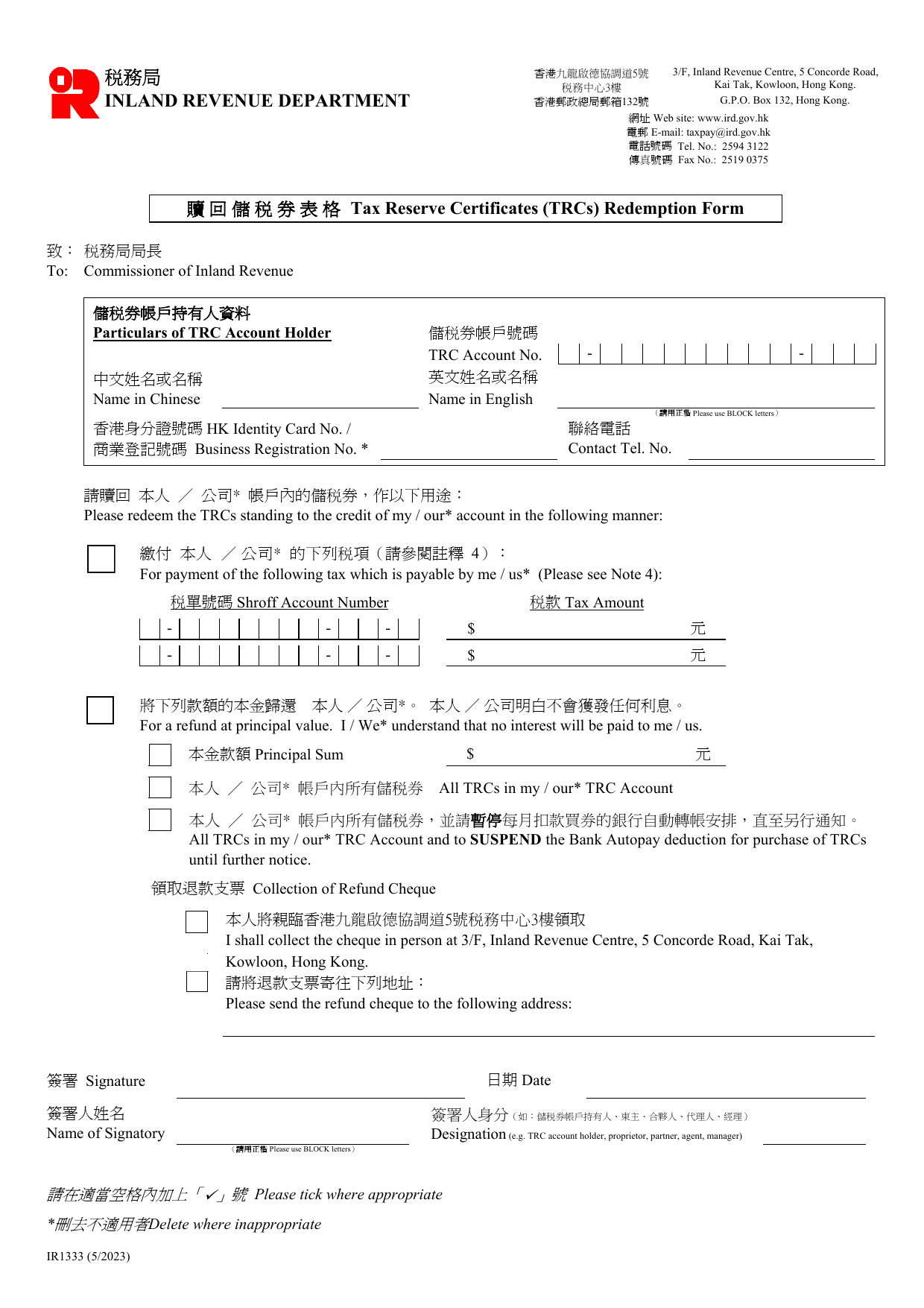
Particulars of TRC Account Holder
TRC Account No. - -
Enter your Tax Reserve Certificate account number exactly as it appears on your account statement. The format is three groups of digits separated by hyphens.
Name in Chinese / Name in English
Write your name in Chinese characters in the left box and your full name in English in the right box. Use block letters for the English name.
HK Identity Card No. / Business Registration No.
Tick the appropriate box. If you are an individual, enter your Hong Kong Identity Card number. If you are a business, enter your Business Registration number (found on your BR certificate). Do not fill both.
Contact Tel. No.
Provide a telephone number where the IRD can reach you during office hours.
Please redeem the TRCs standing to the credit of my / our account in the following manner
You must choose one of the three options below. Delete the options that do not apply.
For payment of the following tax which is payable by me / us (Please see Note 4)
Use this option to pay tax. Fill in the Shroff Account Number (the tax bill number, format - - -) and the Tax Amount in dollars. You can list up to two tax bills. If the redeemed TRCs are not enough to cover the total tax, you must pay the balance on or before the due date (Note 4).
For a refund at principal value. I / We understand that no interest will be paid to me / us.
Use this option if you want cash back without interest. Enter the Principal Sum you want refunded. No interest is payable when TRCs are redeemed for any purpose other than paying the holder’s own tax (Note 5).
All TRCs in my / our TRC Account
Select this to redeem every TRC in the account. If you also want to SUSPEND the Bank Autopay deduction for purchase of TRCs until further notice, tick the second line under this option. This stops future monthly purchases.
Collection of Refund Cheque
Tick one box only.
I shall collect the cheque in person at 3/F, Inland Revenue Centre, 5 Concorde Road, Kai Tak, Kowloon, Hong Kong.
You must attend in person during office hours (Monday to Friday, 8:15 a.m. - 12:30 p.m. & 1:30 p.m. - 5:30 p.m.).
Please send the refund cheque to the following address:
Write your full postal address. The cheque will be mailed there.
Signature and Date
Signature - The account holder (or authorised person) must sign.
Date - Enter the date of signing.
Name of Signatory - Print the signatory’s full name in block letters.
Designation - State the signatory’s role: e.g. TRC account holder, proprietor, partner, agent, manager.
Important notes from the form
- If you use the “Auto Tax Payment Service”, you do not need to submit this form for TRCs bought before the tax due date (Note 1).
- For TRCs bought after the auto redemption date, submit this form immediately (Note 2).
- For jointly-owned property tax or partnership profits tax, submit this form one month before the due date (Note 3).
- Delete the inappropriate options throughout the form.
Download the current form - always file the version on the issuing authority's site, not a copy.
Sources
More on the forms library.