Using Form IR1334 to Requisition a Statement of Tax Reserve Certificates
Request an official statement of your Tax Reserve Certificates from the IRD using Form IR1334; learn the requisition process here.
IR1334 at a glance
- Official title
- Statement of Tax Reserve Certificates Requisition
- Issued by
- Inland Revenue Department
We link the issuing authority's own index rather than hosting a copy, because the form is revised there and an out-of-date copy is worse than none.
Requisition for a Form IR1334 Statement of Tax Reserve Certificates
Form IR1334 is the official form used by a taxpayer who holds Tax Reserve Certificates (TRCs) issued by the Hong Kong Inland Revenue Department (IRD) to request a statement of their certificate holdings. The Form IR1334 statement of tax reserve certificates requisition asks the IRD to produce an official record showing the serial numbers, face values, issue dates and current balance of every TRC registered in the taxpayer's name. The IRD issues the statement free of charge; no administrative fee is payable for submitting the form.
The form exists because TRC certificates are bearer instruments that the taxpayer retains physically (or holds electronically under the Electronic Tax Reserve Certificates Scheme). The IRD does not routinely send periodic statements. A taxpayer who needs to confirm what certificates are on record, for example to support a tax payment application or to reconcile their own records, must make a written request on Form IR1334.
Who May Use the Requisition
Any individual, partnership, corporation or other entity that has purchased tax reserve certificates from the IRD may submit the requisition. The taxpayer must be the registered holder of the certificates. There is no restriction on the number of times a taxpayer may request a statement.
A person who holds certificates on behalf of another, such as a tax representative or an authorised agent, may also use the form provided they include a written letter of authorisation from the certificate holder. The IRD will not release statement details to a third party without proof of authority.
Information Required on the Requisition Form
The taxpayer must provide sufficient details for the IRD to locate their certificate account. The form asks for:
- Taxpayer identification: full name in English and, if applicable, in Chinese characters
- Hong Kong Identity Card number for individuals, or Business Registration number for companies and partnerships
- Correspondence address
- Contact telephone number
If the taxpayer holds certificates under more than one account (for example, personal and business), the form should specify which account the statement relates to. The taxpayer may also add a reference number for their own filing.
The form does not require the taxpayer to list the certificate serial numbers. The IRD will compile the statement from its own records. However, if the taxpayer knows a specific certificate serial number and wants confirmation that the IRD holds it, they may include that number in the remarks section.
How to Submit the Requisition to the IRD
The taxpayer must complete Form IR1334 in full and send it to the Inland Revenue Department. The IRD accepts submissions by post or by hand at the tax reserve certificate section of the department. The form does not require a signature, but the IRD may request one if the information provided is insufficient to identify the taxpayer.
Postal address:
Inland Revenue Department
Inland Revenue Centre
5 Concorde Road
Kai Tak, Kowloon
Hong Kong
The IRD does not currently accept electronic submission of Form IR1334 through the eTAX portal. The taxpayer must use paper. A written request that does not use the official form may be accepted, but the IRD recommends using Form IR1334 to ensure all necessary fields are completed and to avoid delays.
How to Get a Tax Reserve Certificate Statement
A taxpayer who wants a statement of their Tax Reserve Certificate holdings must complete the requisition and send it to the IRD. The IRD will process the request and issue a written statement by post to the taxpayer's registered address.
If the taxpayer holds certificates under the Electronic Tax Reserve Certificates Scheme, the statement will list the electronic certificates in the same format as physical certificates. The statement serves as an official record for the taxpayer's own use or for presentation to a third party, such as a bank or auditor.
How to Check Your Tax Reserve Certificate Balance
The IRD statement produced in response to Form IR1334 will show the current balance of each certificate. The balance is the face value of the certificate less any amount already applied to pay tax. The IRD applies certificates to tax liabilities at the taxpayer's instruction using separate forms (Form IR1333 for redemption of a certificate). The statement reflects all redemptions up to the date the IRD processes the requisition.
If the taxpayer believes the balance shown is incorrect, they should contact the Tax Reserve Certificate Section in writing, providing the certificate serial number and the reason for the discrepancy.
Processing Time and What to Expect
The IRD usually processes a Form IR1334 requisition within 10 working days of receipt. The taxpayer will receive the statement by post. There is no online status check. If the taxpayer has not received the statement after 15 working days, they should telephone the IRD enquiry line and quote the date on which they posted the form.
Related IRD Forms and Procedures
The IRD uses a small family of forms for the Tax Reserve Certificate system:
- Form IR1306: Application to join the Electronic Tax Reserve Certificates Scheme
- Form IR1333: Requisition to redeem a Tax Reserve Certificate
- Form IR1334: Requisition for a statement of Tax Reserve Certificates
A taxpayer who has lost a physical Tax Reserve Certificate should not use Form IR1334. The correct procedure is to notify the IRD in writing and apply for a replacement certificate. The IRD may require an indemnity before issuing a duplicate.
For the Electronic Tax Reserve Certificates Scheme, the taxpayer can view their certificate balance online through the eTAX portal without needing Form IR1334. The paper form is for taxpayers who do not use eTAX or who need an official printed statement.
How to fill out Form IR1334
Page one of the official form. Every field named below appears on it in the same order.
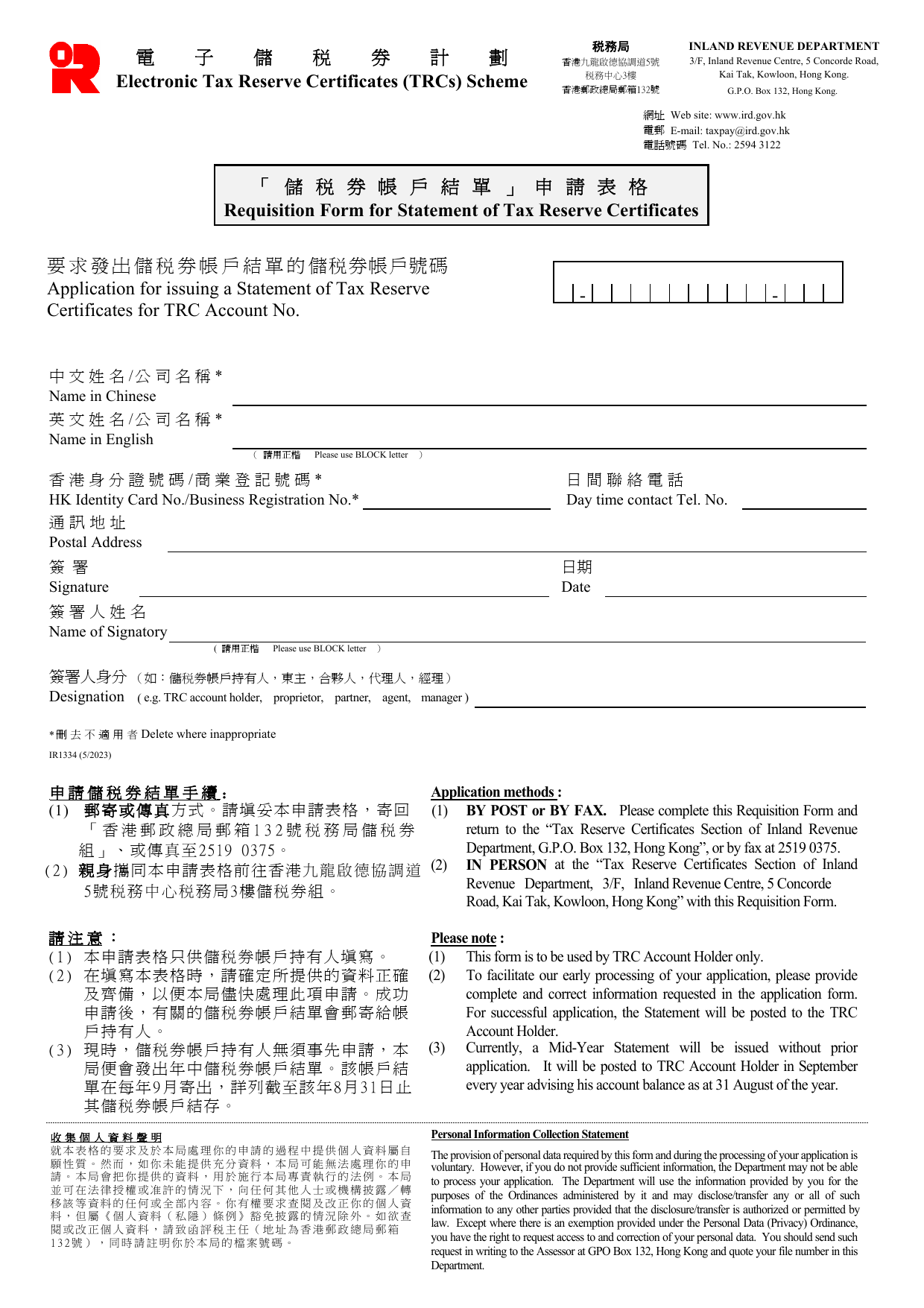
Application for issuing a Statement of Tax Reserve Certificates for TRC Account No.
Enter your Tax Reserve Certificates (TRC) account number. This is the number assigned to your TRC account. If you do not know the number, check previous correspondence from the Inland Revenue Department or any tax reserve certificate you hold. The form provides three short lines and a check box; fill in your account number clearly.
Particulars of TRC Account Holder
Name in Chinese
Write the full name in Chinese characters if the account is held by an individual or a company. If the account is in an English name only, leave this blank.
Name in English
Print the full name in English in BLOCK letters. For an individual, give the name as recorded on the Hong Kong Identity Card. For a company, use the exact registered name.
Hong Kong Identity Card No. / Business Registration No.
Enter your HKID card number (e.g., A123456(7)) if you are an individual account holder. If the account is held by a business, enter the Business Registration number (found on the Business Registration certificate). Cross out the option that does not apply using the instruction “Delete where inappropriate.”
Day time contact Tel. No.
Provide a daytime telephone number where you can be reached. This is not printed on the statement but helps the Department contact you if there are queries.
Postal Address
Write the full postal address to which the statement should be posted. The statement will be sent to this address; see the notes below.
Signature
Sign the form. The signatory must be the TRC account holder (or, if the account is a business, the proprietor, partner, agent, or manager as indicated in the next box). The signature confirms the request.
Date
Enter the date of signing.
Name of Signatory
Print the full name of the person signing in BLOCK letters.
Designation
State your capacity, for example: TRC account holder, proprietor, partner, agent, manager. This field is mandatory so the Department knows who is authorising the request.
Important notes (for information, not fillable)
- This form is only for the TRC account holder to use.
- You must provide complete and correct information to avoid delay. The statement will be posted to the postal address you give.
- You do not need to use this form to request a Mid-Year Statement; that is issued automatically in September each year with the balance as at 31 August.
- The form can be submitted by post to Tax Reserve Certificates Section, G.P.O. Box 132, Hong Kong, or by fax to 2519 0375, or in person at 3/F, Inland Revenue Centre, 5 Concorde Road, Kai Tak, Kowloon.
Common mistakes
- Do not enter a TRC account number that is not yours.
- If the account holder is a company, ensure the Business Registration number is entered and cross out “HK Identity Card No.”
- The signatory’s designation must match the account holder status. An agent must have written authority (the Department may request it), though this is not stated explicitly on the form.
- Signatures and dates are often omitted or illegible; ensure both are present.
Download the current form - always file the version on the issuing authority's site, not a copy.
Sources
More on the forms library.